Your NIC Lives Next Door (And It’s Slowing Everything Down)
You’ve got a brand new dual-socket server, a shiny 25 or 100 Gbit/s link, and yet measured throughput is below expectations. The NIC is fine, the cable is fine, the switch is fine. The real problem is that your CPU and your network card might not be living under the same roof: plugged into the wrong socket, the NIC is a bit like a roommate who moved in next door — every exchange means crossing the hallway, and that costs latency.
A Dual-Socket Server Is Two Computers Holding Hands
A “dual-socket” server is not one big brain. It’s two separate processors, each with:
- its own compute cores,
- its own directly attached RAM,
- its own PCIe lanes (the bus that feeds network cards, storage controllers, GPUs…).
The two processors talk to each other through a dedicated interconnect: QPI or UPI on Intel, Infinity Fabric on AMD. It’s fast, but it’s not free: every round trip across that link costs time and bandwidth.
This is the NUMA principle (Non-Uniform Memory Access): depending on where a piece of data lives, accessing it is either fast (local memory) or slower (memory on the other socket).
Strictly speaking, NUMA is a memory problem: a core on CPU 0 reaches its own local RAM quickly, but every access to CPU 1’s RAM has to cross that interconnect, and an application poorly placed relative to its memory pays that cost on every single access. The network card story told in this article is a related but distinct problem — it’s not about memory access, but about locality on the PCIe bus. Both share the same root cause, the costly inter-socket link, which is why people commonly lump them together under the “NUMA” label even though the term strictly refers to memory. In practice the two frequently compound: a process badly placed relative to its NIC is often also badly placed relative to its memory.
The Diagram That Changes Everything
                         Inter-socket link (UPI / Infinity Fabric)
                    ┌───────────────────────────────────────────┐
                    │                                             │
        ┌───────────┴───────────┐                 ┌───────────────┴─────────┐
        │        CPU 0          │                 │          CPU 1          │
        │   (NUMA Node 0)       │                 │     (NUMA Node 1)       │
        │                       │                 │                          │
        │  Cores 0-15           │                 │  Cores 16-31             │
        │  Local RAM            │                 │  Local RAM               │
        │  PCIe lanes           │                 │  PCIe lanes              │
        └───────────┬───────────┘                 └───────────┬──────────────┘
                    │                                             │
             PCIe Slot #1                                  PCIe Slot #2
                    │                                             │
           ┌────────┴────────┐                           ┌───────┴────────┐
           │    NIC A        │                           │     NIC B      │
           └─────────────────┘                           └────────────────┘
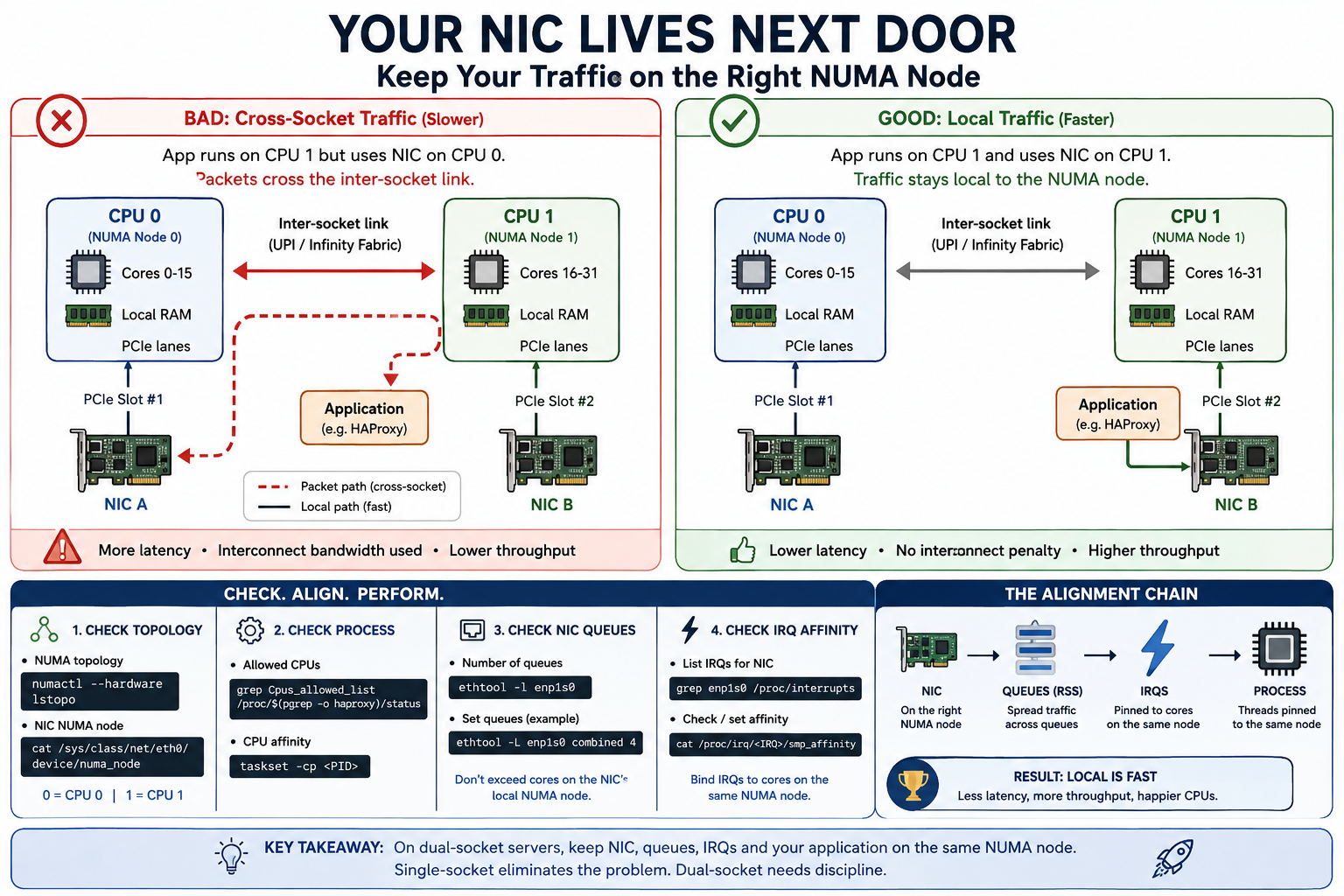
A network card plugs into the PCIe bus, and on a dual-socket motherboard, each PCIe slot is physically wired to one processor only — never both at once.
If an application runs on cores belonging to CPU 1 but uses NIC A, which is wired to CPU 0, every incoming packet must cross the inter-socket link before it can be processed. Added latency, interconnect bandwidth consumed, degraded performance — especially noticeable at high throughput or high packet rates.
How to Identify the Problem
Check the NUMA Node of a Network Card
# Global NUMA topology
numactl --hardware
lstopo

# NUMA node of a network interface
cat /sys/class/net/eth0/device/numa_node
If that last command returns 0, the card is wired to CPU 0. If the application runs on cores belonging to CPU 1, you’ve found your problem.
Check How Many CPUs — and Which Ones — a Process Is Actually Using
Knowing the NUMA node of a NIC is not enough: you also need to know which cores the process handling the traffic is actually running on.
# List of allowed CPUs for the haproxy process
grep Cpus_allowed_list /proc/$(pgrep -o haproxy)/status
This command shows the list of cores on which the HAProxy process is allowed to run (its affinity mask). If that list spans both sockets, the Linux scheduler can freely move the process from one NUMA node to the other — including onto a core far from the NIC being used.
# Number of queues configured on the NIC
ethtool -l enp1s0
This command shows the number of channels (RX/TX queues) configured on the enp1s0 interface. Each queue can be handled by a dedicated interrupt, itself pinned to a specific core — this is what allows network load to be spread across multiple cores on the right NUMA node rather than piling onto just one.
# CPU affinity of a running process (by PID)
taskset -cp <PID>
taskset lets you inspect (and, with the right arguments, modify) the CPU affinity of a running process. Combined with Cpus_allowed_list above, it lets you verify — or enforce — that a process stays confined to the cores of the NUMA node where its NIC lives.
📎 Mindmap of NUMA, NIC and CPU affinity concepts
Multiqueue: Your NIC Can Multitask Too
On many Linux distributions, multiqueue is not necessarily active or properly sized out of the box. It’s worth checking and, if needed, enabling or tuning it — especially on fast interfaces (10 Gbit/s and above) where a single core can quickly become the bottleneck.
Without multiqueue, all network interrupts are handled by a single core: no matter how many cores are available on the right NUMA node, only one carries the entire load. This is particularly damaging on workloads with high connection rates or high packet-per-second counts, such as a load balancer.
You can enable or adjust the number of queues with:
# Set 4 combined RX/TX queues
ethtool -L enp1s0 combined 4
The value you choose should not exceed the number of cores available on the NIC’s local NUMA node: beyond that, queues would be assigned to cores on the wrong socket, negating much of the benefit. To make this setting survive a reboot, persist it through the system’s network configuration (/etc/network/interfaces, udev, systemd-networkd, or a post-up script depending on the distribution).
A modern NIC does not push all its traffic through a single core: it distributes incoming and outgoing packets across multiple hardware queues, managed directly by the card itself. This is what multiqueue means.
The output of ethtool -l enp1s0 looks like this:
Channel parameters for enp1s0:
Pre-set maximums:
RX:             0
TX:             0
Other:          1
Combined:       8
Current hardware settings:
RX:             0
TX:             0
Other:          1
Combined:       4
- Pre-set maximums: the maximum number of queues the card can technically handle (here, up to 8 combined channels).
- Current hardware settings: the number of queues currently active (here, 4 combined channels).
- Combined: a combined channel handles both one RX queue and one TX queue. Some cards separate RX and TX into distinct counters, which then appear on the
RXandTXlines instead ofCombined.
The mechanism that decides which queue each packet lands in is called RSS (Receive Side Scaling): the card computes a hash from certain fields in the packet header — typically source/destination IP addresses and ports — and that hash determines the target queue. The exact fields used are configurable and depend on the card and its driver. Result: packets from the same connection always land on the same queue (and therefore the same core), while different connections can be processed in parallel on different cores.
Each queue has its own dedicated interrupt (IRQ). That IRQ can then be pinned to a specific core — ideally a core on the same NUMA node as the NIC — via /proc/irq/<number>/smp_affinity or irqbalance.
Without explicit configuration, nothing guarantees that these IRQs — and therefore packet processing — stay on the right NUMA node. This is where everything comes full circle: NIC, queues, interrupts, and process affinity must all point to the same socket to avoid unnecessary trips across the inter-CPU link.
Levers to Reduce the Impact
- IRQ affinity: configure network card interrupts to be handled by cores on the correct NUMA node (via
irqbalanceor manual IRQ affinity configuration). - Process pinning (
numactl,taskset): launch network-sensitive applications on the cores of the same NUMA node as the NIC they use. - Physical placement: when choosing PCIe slots for network cards, favour slots wired to the socket that hosts the critical network workloads.
- Virtualisation: in VM or container environments (Kubernetes, KVM…), ensure the scheduler is NUMA-aware (CPU pinning, NUMA-aware scheduling).
Single-Socket or Dual-Socket? A Concrete Case: HAProxy
This topology question is not purely academic: it directly influences hardware choices for network-intensive roles such as a load balancer running HAProxy.
What HAProxy Can Handle on Its Own
Good news: HAProxy is not completely blind to this. It provides two settings directly tied to NUMA and CPU affinity.
nbthread <number>sets the number of threads HAProxy will run on. On supported platforms, if no value is specified, HAProxy automatically detects the number of cores the process is bound to at startup and setsnbthreadaccordingly — meaning you can adjust the thread count simply by constraining the process withtasksetorcpusetbefore launching it, without touching the configuration. Without auto-detection or explicit configuration, the default falls back to 1. The effective value is shown in the output ofhaproxy -vv.numa-cpu-mappinggoes further: on a NUMA-aware platform, this directive lets HAProxy inspect the hardware topology itself and determine the best set of CPUs to use, along with the corresponding thread count. This automatic behaviour is disabled as soon asnbthreadis set manually, when process affinity is already specified (viacpu-map,taskset…), or when the feature is explicitly turned off withno numa-cpu-mappingif the automatic placement proves suboptimal on a given architecture.
In practice, on a dual-socket system, numa-cpu-mapping can do much of the work described above on the administrator’s behalf: detect the relevant NUMA node and confine HAProxy threads to it. But it remains a software workaround for a hardware problem — it does not remove the need to verify that the NIC itself, its queues, and its IRQs are aligned to the same NUMA node.
The official HAProxy documentation points in the same direction: on a dual-socket machine, it advises against spreading processing across both physical sockets and recommends using all the cores of a single physical CPU instead, given the cost of inter-CPU communication. If heavy SSL/TLS workloads justify using both sockets, the same documentation suggests assigning a dedicated NIC to each socket so that each thread group only communicates with the NIC on its own CPU.
Single-Socket vs Dual-Socket
In favour of single-socket:
- HAProxy is primarily a consumer of network bandwidth and a handful of cores, rarely demanding in terms of RAM or heavy computation. A modern high-frequency CPU, even with few cores, comfortably covers the need.
- On a single-socket system, there is only one NUMA node: all NICs, all RAM, and all cores are “local” to each other. The problem described above disappears by design, with no special configuration to maintain.
- Less operational complexity: no IRQ affinity to manage per socket, no risk that a redeployment places the process on the “wrong” NUMA node.
In favour of dual-socket, even for this type of workload:
- If the machine handles multiple roles (reverse proxy + heavy TLS termination + observability + other services), the additional core count and total memory bandwidth of a dual-socket system may become necessary.
- A well-configured dual-socket system (IRQ affinity,
numactl, correct PCIe slot selection) can keep NUMA impact well under control: it is a matter of operational discipline, not an unavoidable penalty. - At very high throughput with multiple NICs used in parallel, a well-planned dual-socket setup can offer more aggregate PCIe bandwidth than a single-socket system.
In practice, for a fleet of servers dedicated to a network-intensive but compute-light role like HAProxy, single-socket is often the simplest and most robust choice: it eliminates the NUMA problem at the source rather than requiring ongoing management. Dual-socket remains worthwhile as soon as the machine must also carry significant compute or memory workloads.
Key Takeaways
In the majority of cases, a network card is wired to a single socket. On a dual-socket server, overlooking this detail can cost dearly in latency and throughput as soon as network load becomes significant. Single-socket eliminates the problem by design; dual-socket demands discipline but remains justified whenever other resources — cores, memory — come into play.
On a dual-socket system, before manually forcing nbthread or CPU affinity to exploit all cores across both sockets, benchmark first: adding more threads may seem logical on paper, but if it causes HAProxy to run threads across both sockets, the inter-CPU communication overhead can actually hurt performance instead of improving it. HAProxy’s automatic settings (numa-cpu-mapping, cpu-policy) generally provide a safer starting point; any manual configuration should be validated under real load before going to production.